See what's going on in the chemistry
Debugging during runtime
ProDiMo writes more output and waits for interactive commands if you increase verbose_level in Parameter.in. Even better, leave verbose_level=0 there, but change chemistry_and_energybalance.f and uncomment a line like
if ((ix.eq.11).and.(iz.eq.10)) verbose=1which tells ProDiMo to increase verbose_level once a certain grid point is reached. The meaning of verbose is ...
 verbose = -1   : no wait, only very little warnings
 verbose = 0    : no wait, standard warnings
 verbose = 1    : wait for return (or other command) after finishing one grid point
 verbose = 2    : wait after every Newton-Raphson chemistry step
 verbose = 3    : (can't remember)
 verbose = 4    : check analytic against numerical chemical Jacobian
Now, if ProDiMo waits for input (verbose>0) you can just press ENTER to go to the next point. Or, you can give one of these commands
 ENTER      : next point
 0...4      : change verbose level
 Q          : search for thermal bifurcations
 character  : go to chemical analysis
Meaning of reaction types
The meaning of the chemical reaction types are described in the chemistry solver page (see chemistry_solver_design).
Analyze the chemistry
If ProDiMo waits for input (verbose>0) and you type a character, you are prompted for the name of a species for chemical analysis. Type 'q' if you want to return without analysis
 input species to analyse ...
> H2O
  gas temperature =   980.861597112949
 H nuclei density =   1885537853.20952
              chi =   112260.313525271
 formation ... H2O
   27    55 NN: H2     + OH       --> H2O    + H     2.11E-12 1.06E-06
  918 10044 PH: H3O+   + PHOTON   --> H2O    + H+    1.65E-02 8.64E-08
 destruction ... H2O
  806  4205 PH: H2O    + PHOTON   --> OH     + H     1.80E+00 1.16E-06
  915 10040 P3: H2O    + PHOTON   --> O      + H2    6.40E-03 4.11E-09
 particle density = 6.426E-07 concentration = 3.408E-16
 total rate = 1.275E-22
 input species to analyse ...
> q
particle density is in , concentration means , total rate is the sum of all rates , should be zero. The meaning of the reaction entries are as
   27       55      NN:    H2 + OH --> H2O + H    2.11E-12    1.06E-06
  ^^^^     ^^^^    ^^^^                           ^^^^^^^^    ^^^^^^^^
 running   number  type    reaction              rate coeff     rate
 reaction  in                                    [depends]    [1/cm^3/s]
 number    UMIST
The rate is the rate coefficient multiplied by the particle densities of the reactants, except for ice desorption, which is more difficult.
Search for thermal bifurcations
If you press "Q" instead, ProDiMo varies the Tgas systematically between 20K and 10000K, calls the chemistry, calculates the net heating function Q(Tgas) and lists the results, before going to the next grid point. For thermal stability Q(Teq)=0 and Q'(Teq)<0 at the equilibrium gas temperature Teq=Tgas(Q=0). It is possible that there exists more than one root of Q(Tgas)=0, a physical non-uniqueness of the condition of gas energy balance, sometimes referred to as "thermal bifurcations". You can manually search for these bifurcations this way.
Save and analyse chemical rates
The switch
.true. ! chemanalysiswill ask ProDiMo to write a special output file chemanalysis.out. If ProDiMo is run with .true. ! time_chem_disk the output will have a postfix chemanalysis_xx.out for each time-step of the time-dependent chemistry model (i.e. in the same way as for the ProDiMo.out). This file contains all the required information such as chemical rates for each grid point, and can be analysed either with IDL scripts or prodimopy.
The chemanalysis data can be read by IDL routines (see below) or by using the tools included in , it also includes some notebooks on how to use it, see the notebooks folder of the git repository.
Analysing with prodimopy
If you work with prodimopy, we recommend to use in Parameter.in
.true. ! chemanalysis_fitsinstead of chemanalysis. In that case the output is written to a fits file, which results in a much smaller file size, and improves the performance of the analysis scripts.
Examples on how to analyze the chemistry and make some figure can be found in the chemanalysis example notebooks.
Analysing with IDL
Note: I think at the moment IDL cannot deal with the time-dependent chemanalysis (with prodimopy it can be done).
IDL> .compile ../idl/prodimo
IDL> .compile ../idl/chemanalyse
IDL> chemanalyse,'name',/readdata
where name is the name of a species, for example
IDL>chemanalyse,'H2O' ,/readdataThe switch is threadsafe because the output starts with the grid position ix and iz and the IDL routines can read the output in any order.
The IDL routine will write on screen all the formation and destruction reactions for this species. It will also output an ascii files chemistry_reactions_name.txt listing the main formation and destruction reactions. The first column is an index. The indices are used in the ps output files named chemistry_analysis_name.ps, where again the name is the name of the species. The optional input /readdata is only necessary the time to create a xdr file, which is much faster to read for IDL if, for example, you ask for another species to be analysed (see example below).
Example of chemistry_reactions_H2O.txt
-----------------------------------------------------
Main formation and destruction reactions
species :H2O

Formation reactions
       1      31      55 NN: H2     + OH               -> H2O    + H

       2     169     421 NN: NH2    + NO               -> N2     + H2O

       3     173     426 NN: OH     + OH               -> H2O    + O

       4     583    2119 IN: H3O+   + Si               -> SiH+   + H2O

       5     942    3563 DR: H3O+   + e-               -> H2O    + H

       6     999    4084 RA: H      + OH               -> H2O    + PHOTON

       7    1149    4557 CL: H      + OH               -> H2O    + M

       8    1183   10044 PH: H3O+   + PHOTON           -> H2O    + H+

       9    1197   10273 NN: H2exc  + OH               -> H2O    + H
      10    1211   10288 DT: H2O#   + dust             -> H2O    + dust

      11    1213   10290 DP: H2O#   + PHOTON           -> H2O    +


Destruction reactions
       1       9      10 NN: H      + H2O              -> OH     + H2

       2     355    1191 IN: C+     + H2O              -> HCO+   + H

       3     573    2061 IN: H2O    + Si+              -> SiOH+  + H

       4     577    2067 IN: H2O    + SiH+             -> Si     + H3O+

       5     633    2951 CE: H+     + H2O              -> H2O+   + H

       6    1050    4205 PH: H2O    + PHOTON           -> OH     + H

       7    1051    4206 PH: H2O    + PHOTON           -> H2O+   + e-

       8    1210   10287 IC: H2O    + dust             -> H2O#   + dust

-----------------------------------------------------
As usual name# means the icy species.
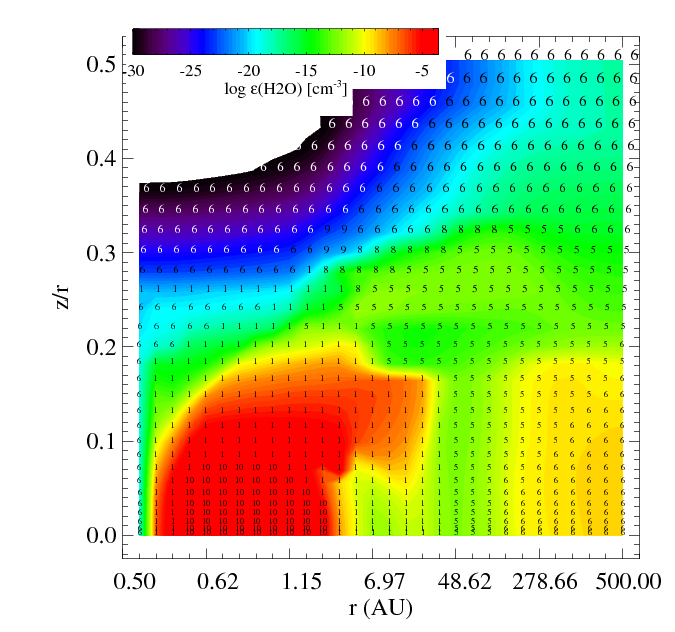
The figures show the main and second formation and destruction reactions at each location in the disk where the numbers are the reaction indices found in the chemistry_reactions_name.txt
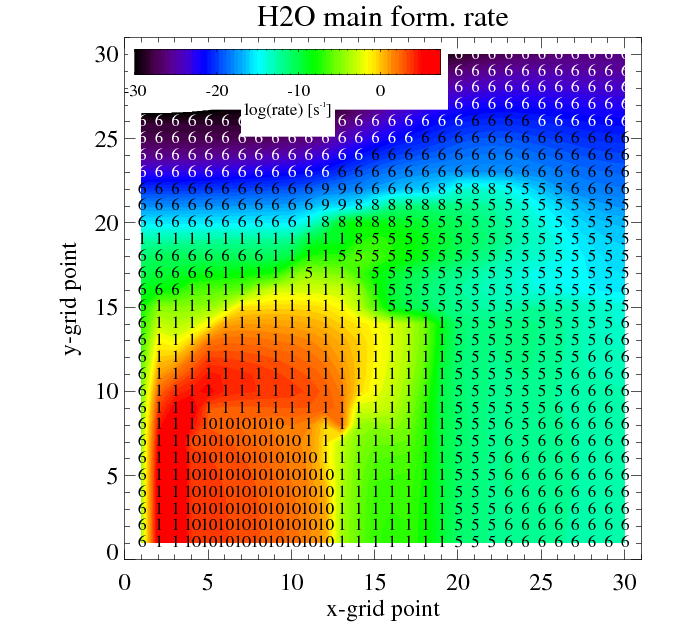
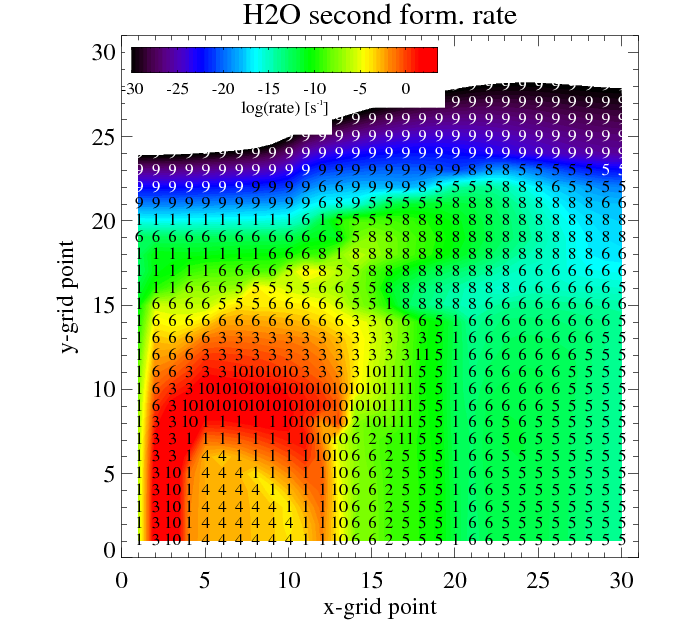 Filled contours: rate of the main (left) and second (right) most formation reaction. Numbers: index of the reaction
 |
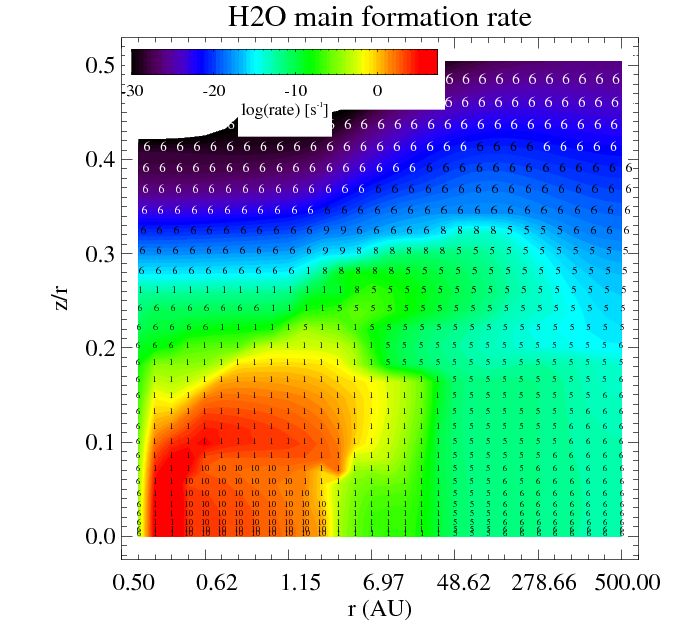 |
| Filled contours: water relative abundance epsilon. Numbers: index of the reaction | Filled contours: total formation rate. Numbers: index of the reaction |
Similar plots are made for the destruction reactions.
After chemanalysis.pro is finished producing the ps-file, the user can enter a manual point-by-point analysis, with similar output as described on the top of this page. Start by entering the point-coordinates ix,iz, then you can have a look at the most important formation and destruction rates of selected molecules one by one. Don't be surprised if the total formation and total destruction rates are not entirely equal, because in the chemanalysis-mode, only a few of the most relevant reaction rates are stored on file.
   Do you want to analyse one point, manually?  ix,iz=?  (0,0 = exit)
: 70,39
    grid point =      70      39
radius[AU],z/r =    151.18    0.1480
n<H>,nd[1/cm3] =  1.83E+06  7.26E-05
 Tgas,Tdust[K] =   44.7594   58.4410
 AV_rad,AV_ver =  2.01E-01  2.87E-04
abundant molecules: H2 H He O C Ne N CO Ar e- H2exc H+ Ne+ S+ C+ CH3+ C2 CH C2H
------------------------------------------------------------------------
nmol(  HCO+)[1/cm3], concentration =  4.683E-03  2.553E-09
Total formation rate [1/cm3/s]   =   7.8321741e-09
  931  2321 IN:  CH3+   + O              -> HCO+   + H2             7.38E-09
 1669  3919 IN:  O      + C2H2+          -> HCO+   + CH             2.07E-10
    1    64 AD:  CH     + O              -> HCO+   + e-             1.12E-10
 1674  3926 IN:  O      + C3H3+          -> HCO+   + C2H2           5.95E-11
  890  2221 IN:  CH2+   + O              -> HCO+   + H              4.36E-11
 1113  2664 IN:  H2     + CO+            -> HCO+   + H              2.85E-11
Total destruction rate [1/cm3/s] =   7.8774804e-09
  646  1357 DR:  HCO+   + e-             -> CO     + H              6.61E-09
  830  2134 IN:  C      + HCO+           -> CO     + CH+            1.26E-09
 2200  5957 PH:  HCO+   + PHOTON         -> CO+    + H              7.31E-12
 1730  4032 IN:  OH     + HCO+           -> HCO2+  + H              1.09E-13
 1174  2777 IN:  H2O    + HCO+           -> CO     + H3O+           2.51E-14
 1316  3137 IN:  HCO+   + C3H2           -> C3H3+  + CO             2.17E-14
------------------------------------------------------------------------
: CH3+
nmol(  CH3+)[1/cm3], concentration =  3.379E-02  1.842E-08
Total formation rate [1/cm3/s]   =   1.3816863e-07
 1110  2658 IN:  H2     + CH2+           -> CH3+   + H              1.38E-07
 1279  3069 IN:  H      + CH4+           -> CH3+   + H2             1.05E-10
 2161  5876 PH:  CH3    + PHOTON         -> CH3+   + e-             3.17E-11
 1676  3957 IN:  O      + CH4+           -> OH     + CH3+           2.73E-11
 2332 10029 PH:  CH5+   + PHOTON         -> CH3+   + H2             3.35E-12
 1671  3921 IN:  O      + C2H4+          -> CH3+   + HCO            1.28E-12
Total destruction rate [1/cm3/s] =   1.3857571e-07
 2159  5874 PH:  CH3+   + PHOTON         -> CH2+   + H              2.97E-08
 2158  5873 PH:  CH3+   + PHOTON         -> CH+    + H2             2.97E-08
  586  1184 DR:  CH3+   + e-             -> CH     + H2             2.70E-08
  587  1185 DR:  CH3+   + e-             -> CH     + H      H       2.29E-08
  585  1183 DR:  CH3+   + e-             -> CH2    + H              1.07E-08
  824  2124 IN:  C      + CH3+           -> C2H+   + H2             9.92E-09
------------------------------------------------------------------------
:           <-- just hit RETURN here to exit this loop
Do you want to analyse one point, manually?  ix,iz=?  (0,0 = exit)
: 0,0
% Stop encountered: CHEMANALYSE      1407 /home/star/pw31/ProDiMo/idl/chemanalyse.pro
An other option is
IDL> reaction_network,8,25where 8 and 25 are the x and z grid index. The IDL routine will list on the screen the main formation and destruction reactions for all the species at the grid location (x,z).
Make species network
       1 1st :      622 species :He  nparents =       2 :H He+  -> He H+
       1 1st :     1095 species :He nchildren =       1 :He CRP -> He+ e-

       2 1st :     1095 species :He+  nparents =       2 :He CRP  -> He+ e-
       2 1st :      622 species :He+ nchildren =       2 :H He+ -> He H+

       3 1st :      971 species :C  nparents =       1 :C+ e-  -> C PHOTON
       3 1st :     1021 species :C nchildren =       1 :C PHOTON -> C+ e-

       4 1st :     1021 species :C+  nparents =       2 :C PHOTON  -> C+ e-

.......